


Explore elegant accessories with Moda. Improve product discovery...
👀 3064 views
❤️ 307 likes
Too Long;
Didn't Read
er patient overview, 38% less information overload. See how a clinical record interface replaced paper printouts:
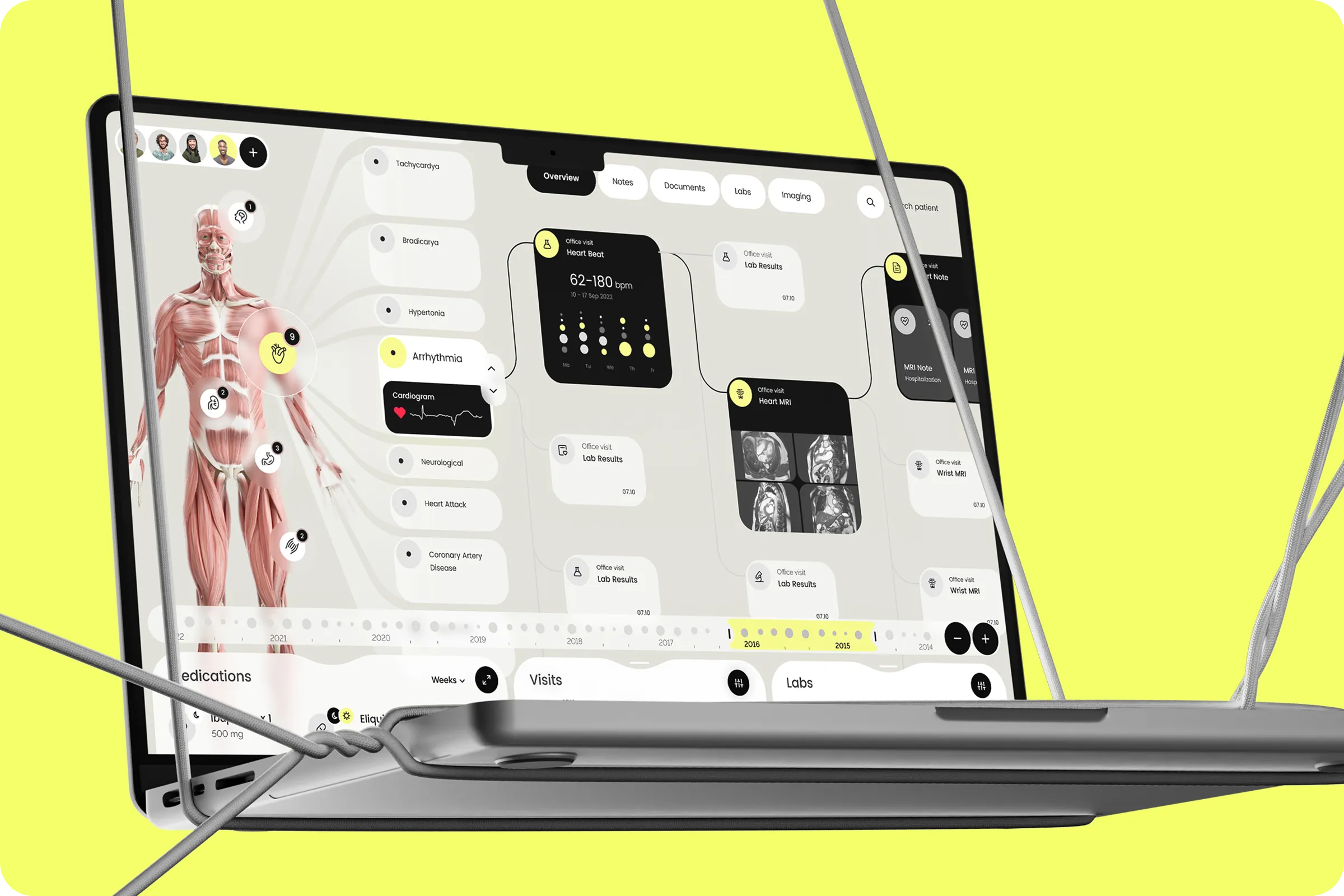
We want to improve how our clinic handles medical data by building a system that shows a complete, accurate patient profile.

Co-founder at EMR+

A clinic-focused electronic medical record system that helps medical providers track patient data over time. The system organizes diagnoses, lab results, medications, and vitals to improve care decisions and patient outcomes, designed for the specific pace and pressure of clinical work rather than for administrative compliance.
Industry
Healthcare
Category
SaaS, Dashboard
Location
LA, California, USA

Doctors needed a way to access and understand patient data across visits without losing the thread of a patient's story. The previous system had a confusing structure that made it hard to read notes, identify changes, or follow the full treatment path, which is the exact failure mode that pushes clinical teams back toward printed paper charts.
Relevance of Information
Doctors lacked visibility into recent at-home treatments and external medication use. That gap forced guesswork at the point of prescription, increasing both diagnostic risk and the cognitive burden of building a complete patient picture from fragments.
Workflow Inefficiency
The interface buried urgent information behind multiple screens and tabs. Prioritizing care became a navigation task rather than a clinical judgment, which is where electronic medical records interface design either earns clinical trust or loses it permanently.

We conducted interviews and tested early designs with medical professionals across the project. The goal was to understand what slowed clinical decision-making and where existing systems failed to support it, working from observed behavior rather than assumed workflow preferences.
65% Preferred Offline Printouts
Most doctors found paper charts faster to navigate than the digital system. They struggled to locate related records and connect the thread of a patient's history across visits, confirming that the software was adding steps instead of removing them.
41 % Low Interface Satisfaction
User feedback placed interface satisfaction below expectations, driven primarily by visual overload and unclear navigation hierarchy. Simpler grouping and clearer prioritization were the consistent requests across every interview session.

We designed a timeline-based medical record dashboard that shows all critical data, including vitals, medications, diagnoses, and tests, in one interface structured by date and type. Data is grouped visually and prioritized to reduce overload and improve focus, so a doctor opening a patient record sees the story of that patient's care rather than a database to query.
We turned a fragmented record into a visual patient story that doctors can read in real time.

CEO

The redesigned electronic medical record system helped doctors save time, reduce uncertainty, and deliver care faster. Medical teams viewed patient history 45% quicker, and satisfaction with the system increased after release, confirming that the timeline-based approach closed the specific gap that had been driving clinical teams back to paper.
+45% Faster Patient Overview
Streamlined layout and data filters gave doctors access to patient records significantly faster during consultations. The timeline structure eliminated the screen-switching that had previously broken clinical focus at the moments when it mattered most.
-38% Lower Information Overload
The new structure improved clarity and reduced time spent sorting through unrelated data fields. Visual grouping by date and type gave clinical users a navigable record rather than an undifferentiated list, which is the core discipline an electronic medical record example in this category has to demonstrate to earn adoption over printed alternatives.

After testing the system, we’re ready to move forward with responsive layouts and adaptive solutions for other departments.
Co-founder at EMR+
Explore elegant accessories with Moda. Improve product discovery...
👀 3064 views
❤️ 307 likes
Discover our UX/UI design for Amberlens. We built...
👀 2853 views
❤️ 414 likes
SailMatch - Premium Yacht Booking Service Mobile App...
👀 3047 views
❤️ 336 likes
Explore the Moody e-commerce case study. See how...
👀 1632 views
❤️ 362 likes
Shall we chat?
[email protected]Let’s

talk


