


Explore elegant accessories with Moda. Improve product discovery...
👀 3064 views
❤️ 307 likes
Too Long;
Didn't Read
36% faster incident resolution and 2.4x faster access to key metrics. Here is how an AppDynamics dashboard redesign got there:
We need a dashboard that simplifies monitoring tools and offers real time data visualizations that define pain points.

Co-founder at AppDynamics

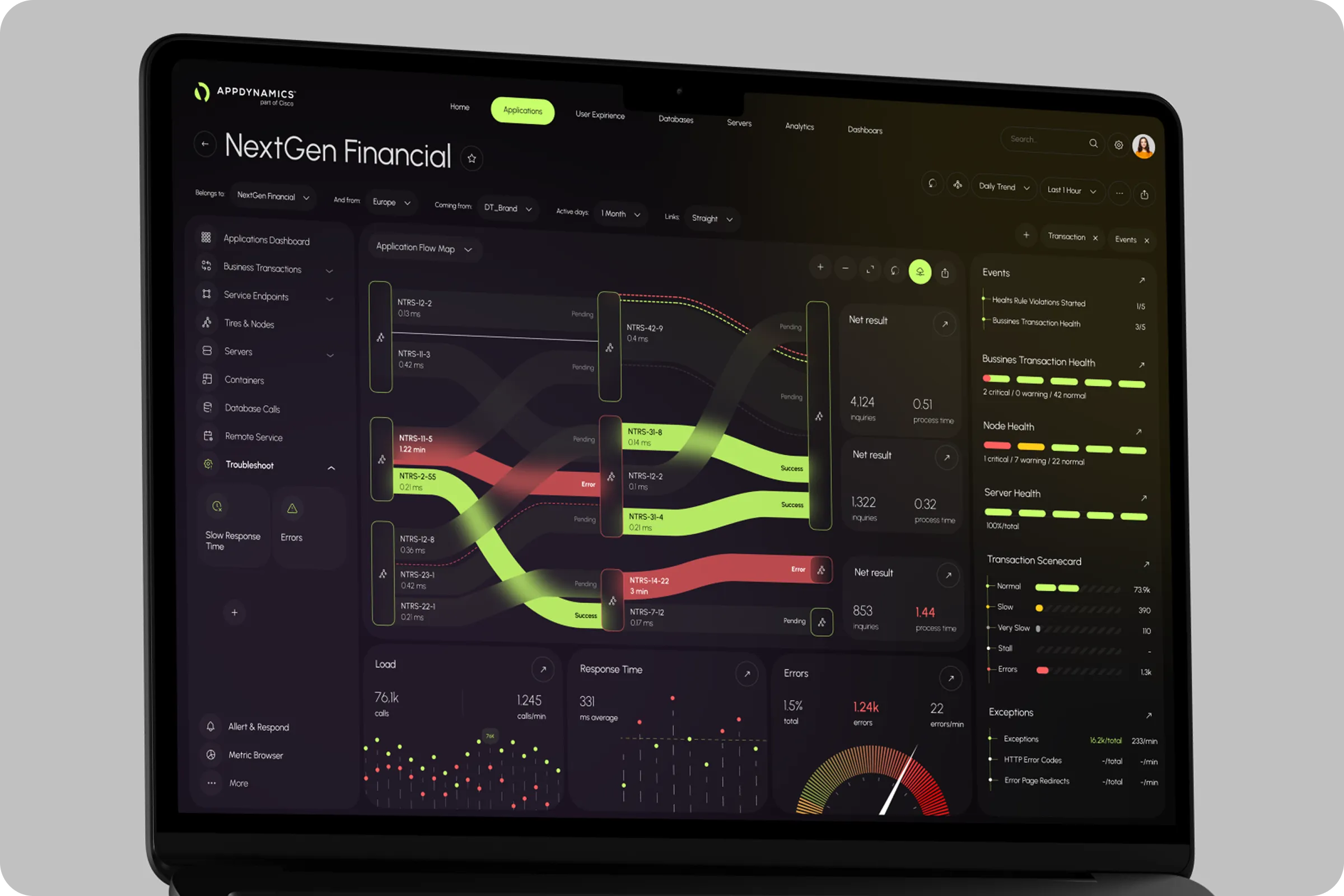
AppDynamics App Performance Monitoring Dashboard is a UX/UI solution for tracking app and infrastructure performance. It sits in application performance monitoring apm, where response times, service health, and infrastructure load shift minute by minute. Developers, QA engineers, analysts, and leadership read the same data for different reasons. The old experience spread that data across separate dashboards and tools, so every investigation opened with a search for the right screen. Our goal was to translate complex telemetry into an interface people can trust under pressure. That meant faster response, a direct path from each role to the data it needs, and one visual logic from the overview down to a single trace. We built around the moments teams care about most: an alert fires, a service slows, a release goes out. Each moment got its own route through the product.
Industry
APM (Application Performance Monitoring)
Category
SaaS
Location
Washington, D.C., USA

Picture an on-call engineer at 2 a.m. An alert fires, and the answer lives in five places. Key metrics were spread across views and tools, so people jumped between dashboards just to learn what was happening.
The visual language had aged. Charts, colors, and status markers changed from screen to screen. Scanning slowed, trend comparisons blurred, and anomalies slipped past.
Layouts were fixed. They ignored live user behavior and shifting system conditions, and teams could not reshape the view as an incident developed.
Investigation turned into manual assembly. Logs, alerts, traces, and app performance data sat in separate places with their own filters, timestamps, and context. Every switch added mental load at the exact moment focus mattered most.

We mapped the full journey first. Through ux research and stakeholder workshops, we defined the key personas, their goals, their blockers, and the points where they make decisions. Navigation then followed real workflows: checking overall health, drilling into services and transactions, tying performance to infrastructure signals, and running root-cause analysis.
Clarity came next. Priority metrics got a strict visual order, repeating patterns, and short contextual notes, so the gap between normal and abnormal reads instantly. Metrics, logs, and traces share one surface, the core of application performance monitoring and observability.
Interaction closed the loop. Filters, comparison views, and guided drill-down paths move users from high-level trends to detailed diagnostics without losing context. Actionable cues help teams spot issues sooner, share findings, and restore performance with confidence.
Our aim was to support user goals, not just present data.

Team Lead

The target was a flexible web UI that gives AppDynamics a clear visual form. It tracks app behavior live, lowers monitoring fatigue, and speeds up discovery through a connected performance management experience. Success meant apm app performance monitoring that answers the first question of an incident on the first screen.

We ran sessions with product managers, QA engineers, and developers to find usage gaps. Two priorities rose to the top across every group: real-time responsiveness, and AI-supported event clustering that groups related signals into one incident.
Internal product audits and user session reviews exposed the blockers. We weighed each one against the app performance measures that matter during an incident: speed to insight, alert accuracy, and daily engagement.
67% used non-AI flows
Users did not trust the existing AI logic. Clear visual explanations raised adoption by 32% during testing.
41% delay in alerts
Notification logic ignored issue severity. The lag slowed response time and dragged on support metrics.
52% ignored historical data
Users favored live metrics and missed the patterns behind repeat issues. Compact trend visuals now surface history without crowding the layout.

Three moves define the build: a flexible component grid, unified alert states, and layered service maps that mirror the application performance monitoring architecture from service down to host. The interface adapts to each user role. The visual system stays consistent with the AppDynamics brand and its business goals.
Role-Based Interface Logic
The layout responds to who is looking: engineers, analysts, or leadership. Each role lands on a tailored view with no extra navigation.
Unified Alert Structure
One visual system now covers alerts across metrics and services. Users rank actions faster, and duplicate notifications no longer compete for attention.

The redesign is a practical digital transformation of how technical teams monitor production. Alert response sped up and user drop-off fell. Engineers reached key metrics 2.4x faster, session duration rose by 39%, and dashboard interaction improved across every role.
+36% Faster Incident Resolution
A clear alert structure and a tighter data layout cut mean time to resolution by 36%. Support teams closed issues in fewer steps and with higher accuracy.

Explore elegant accessories with Moda. Improve product discovery...
👀 3064 views
❤️ 307 likes
Discover our UX/UI design for Amberlens. We built...
👀 2853 views
❤️ 414 likes
The SailMatch - Yacht Personalized Searching Service Onboarding...
👀 3176 views
❤️ 343 likes
Organize athlete training, match data, and performance tracking....
👀 3173 views
❤️ 320 likes
Shall we chat?
[email protected]Let’s

talk


