


Explore the Moody e-commerce case study. See how...
👀 1632 views
❤️ 362 likes
We require a training dashboard design that shows athlete progress and match performance data, helping coaches track efficiency and improve decision-making.

VP of Product at Athlet Analyzer

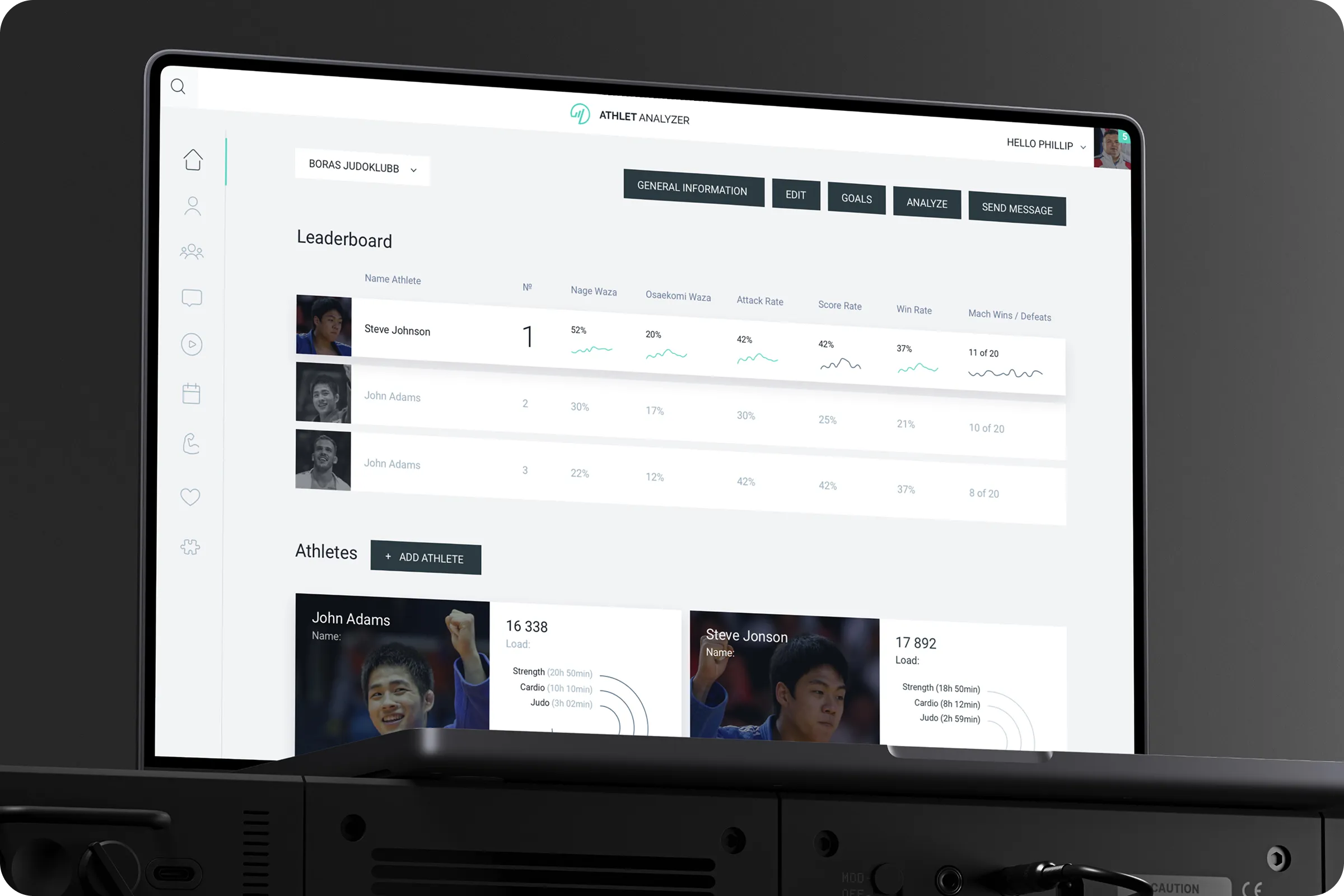
The Athlet Analyzer - Sport Athletes Training Dashboard project organizes athlete training, match data, and performance tracking in one interface. The dashboard helps users compare stats, monitor efficiency, and simplify decision-making for training sessions.
Industry
Sport
Category
Dashboard
Location
LA, California, USA

Athletes and coaches often manage performance data across multiple tools. This creates fragmented insights and slows down training analysis. Existing systems lack intuitive dashboards, making it difficult to compare stats, track load, or see progress clearly.
Low Visibility of Progress
Users struggle to see training loads and match results in a simple visual form. This limits their ability to adjust programs quickly.
Fragmented Data Tracking
Coaches often work with different sources of stats, making it hard to get a full picture of athlete performance. This increases time spent on analysis.

Through research within Athlet Analyzer - Sport Athletes Training Dashboard example, we learned that coaches focus on clear, visual metrics. Surveys showed they wanted comparative stats, athlete load tracking, and quick access to win/loss ratios. Data visualization increased understanding and improved retention.
67% - Asked Training Load Visualization
Coaches needed fast access to workout time split across cardio, strength, and sport-specific drills. This improved clarity of training planning.
52% - Wanted Comparative Match Stats
Users asked for win/loss and scoring rates directly visible. This highlighted progress and supported better coaching discussions.

We built an interface that merges athlete loads, match results, and technique performance into a single dashboard. The Athlet Analyzer - Sport Athletes Training Dashboard design focused on graphs, radar charts, and progress indicators for quick analysis. UX ensured navigation was clear for both coaches and athletes.
Visual Performance Metrics
Graphs and diagrams translated raw stats into visuals, making performance trends easy to interpret.
Athlete Profile Insights
Detailed athlete cards with load times and match history allowed quick review of individual progress.
Athlete cards became the shortcut for coaches to see strengths and gaps. The radar charts turned numbers into clear, comparative visuals.

UX Architect

The Athlet Analyzer - Sport Athletes Training Dashboard example improved data clarity and reduced analysis time. Coaches gained faster insights into athlete stats, and user engagement increased with visual tracking.
+35% Faster Analysis
Coaches reported reduced time spent on preparing reports and reviewing final match results. This allowed them to dedicate more time to direct training and athlete feedback.
+28% Higher Engagement
Athletes interacted more with their stats and progress, leading to better retention in training programs. The increased visibility of progress motivated athletes to stay consistent in practice.

We will continue with adaptive versions of the dashboard for tablet and mobile use to expand training flexibility.
VP of Product at Athlet Analyzer

Explore the Moody e-commerce case study. See how...
👀 1632 views
❤️ 362 likes
SailMatch - Premium Yacht Booking Service Mobile App...
👀 3047 views
❤️ 336 likes
Explore elegant accessories with Moda. Improve product discovery...
👀 3064 views
❤️ 307 likes
Explore the Solvely AI UX/UI case study. We...
👀 1634 views
❤️ 378 likes
Shall we chat?
[email protected]Let’s

talk


